Discovery & Social Feed
Discovery is how people find your events, a searchable web page and an in-app map and feed that surface public events near a viewer. This guide covers exactly how a public event shows up in Discover (visibility levels and geocoding), the map feed and how it blends your events with events from around the web, subscribable public calendars (ICS), universal search, the social event feed and who's-going, and the alerts people can subscribe to.
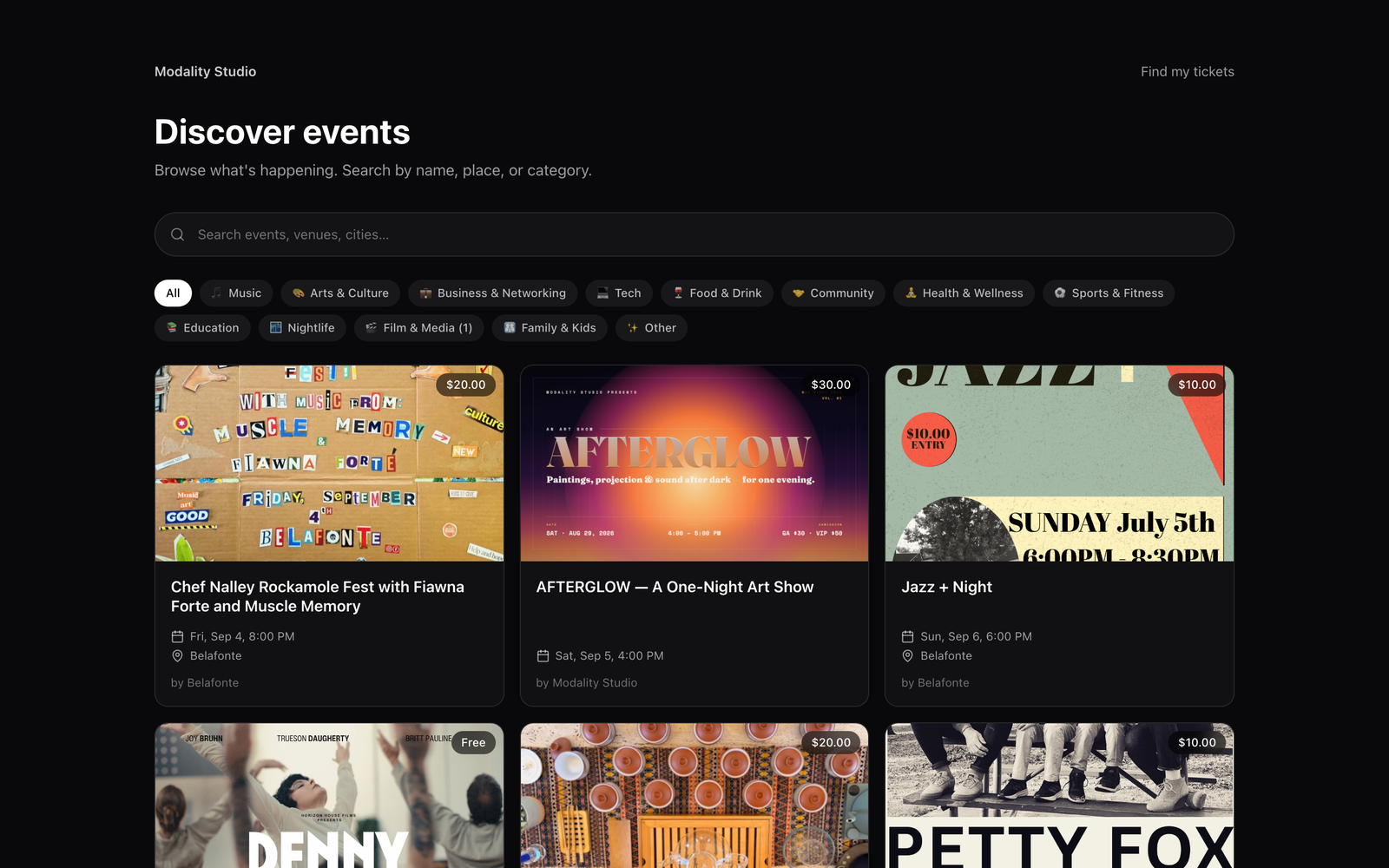
What Discovery Is
There are two Discovery surfaces, both fed from the same rules:
- The web Discover page at
/discover, a public, no-login page for browsing and searching upcoming events by name, place, or category. It renders fresh on every request (it's time-sensitive), showing only your own Modality events that are public and published. - The in-app map & feed (Modality mobile app), a location-first map and list that merges your Modality events with cached events from around the web, so a viewer sees what's happening near them even before your calendar is dense in that city.
Both surfaces are cross-workspace by default, they show events from every organizer, and anonymous viewers are fully supported. Signing in only adds personal touches (friends-going counts, personalized ordering, saved alerts).
How Public Events Surface: Visibility & Geocoding
Two things decide whether an event shows up in Discover: its visibility level and whether it has coordinates.
Visibility levels
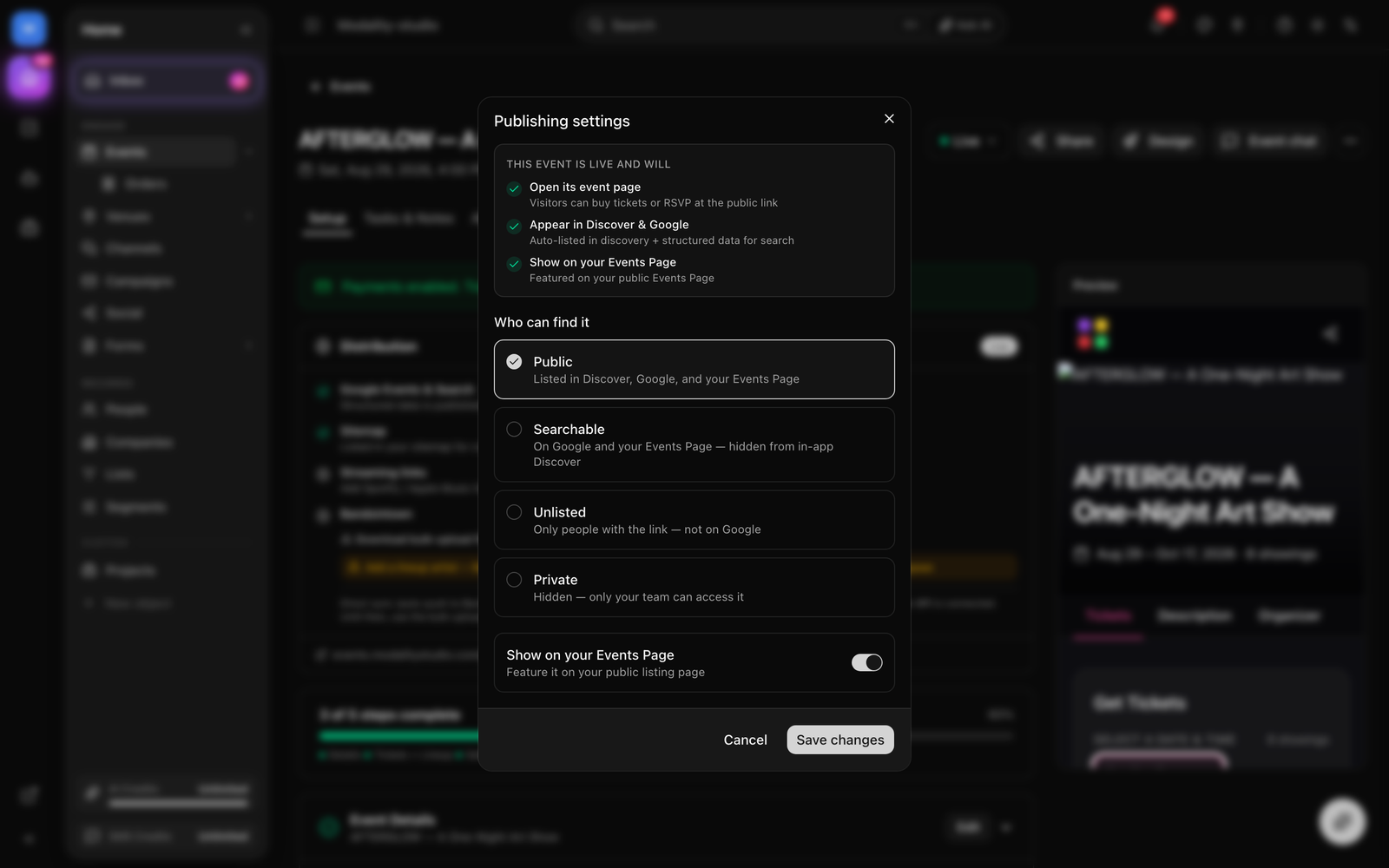
Set the level in the Go Live dialog when you publish (see the Events guide). Discovery treats them as:
- Public, eligible for the in-app Discover map/feed, the
/discoverpage, and cross-workspace search. This is the only level that appears on the discovery map. - Searchable, indexable on Google and shown on your own public Events Page, but hidden from in-app Discover and the cross-workspace map.
- Unlisted, reachable only by direct link; not on Discover.
- Private, hidden entirely; only your team can access it.
Coordinates (geocoding)
The map is a proximity query, it can only place an event that has a latitude and longitude. Modality resolves coordinates for you automatically:
- Geocoded on write, when you save an event with a venue/address (and no explicit coordinates), Modality geocodes the address in the background and stores
lat/lngpluscity,region, andcountryon the event. - Provider, geocoding uses Google Places when a
GOOGLE_PLACES_API_KEYis configured, and automatically falls back to OpenStreetMap Nominatim (free, no key) if Google is unavailable, so it never goes dark. Geocoding is best-effort and never blocks saving the event. - Venue-coordinate fallback, if an event row has no coordinates of its own but is linked to a Venue that does, the map query falls back to the venue's coordinates (
COALESCE(event, venue)) so the event still places correctly.
"Upcoming" and recurring events
By default Discovery shows upcoming events, the event's own start date is in the future, it has no fixed date, or it has any future showing. This means a recurring / multi-showtime event stays in Discovery even after its first showing passes, and every card reports its next live date (not the stale first date) and sorts by it.
The Discovery Map
The in-app map feed answers a single question: "what's happening near this spot?" It takes a center point and radius and returns a merged, de-duplicated list of events to place as pins and list rows.
How the feed is built
- The app requests
/api/v1/discover/mapwith alat,lng, andradiusMi(default 25 mi, up to 500), plus an optional date window (from/to) orwhen=all. - Modality runs a Haversine proximity query over its own public/published events and over a cache of external events, keeping anything within the radius.
- A date window is applied by default, a 7-day lookahead from the start of today when no explicit range is given.
when=alldrops the window (keeping past and undated events). A multi-night event stays on the map for every showing that falls inside the window, not just opening night. - Results are de-duplicated and sorted (see below), then returned. A signed-in viewer also gets a per-event
friendsGoingcount and personalized ordering.
Where the "events from the web" come from
To make the map useful in a city where your own calendar is still thin, Modality maintains a cache of external events per metro (a rounded coordinate cell). When someone views a cold or stale metro, an ingest is triggered (via a durable Cloud Task, with an in-process fallback for local dev) and the response signals ingesting so the app can re-poll for the warmed results. The cache has a 12-hour freshness window, so repeated views don't re-hit upstream sources.
- Aggregated sources, major public ticketing and event platforms feed the external cache (rate-limited sources are fetched less often to conserve quota).
- Own venue harvest, a curated registry of public venue calendars is harvested directly, reading either schema.org
EventJSON-LD from a venue's events page or a subscribable.icsfeed, with the venue's coordinates as a fallback location.
De-duplication, boosting & personalization
- Cross-source dedup, the same real event arriving from multiple providers is collapsed to one card; an external event that matches one of your native events (by normalized title + same day) is dropped in favor of the native one.
- Boosted placement, a native Modality event whose workspace is on a paid plan (Pro or Business, active or in an unexpired trial) floats to the top of the feed with a Featured treatment.
- Affinity ranking, for a signed-in viewer, ordering is personalized from learned category and metro affinity (boosted events still lead). Anonymous reads keep a deterministic order so the public map stays cacheable.
- Friends going, a signed-in viewer sees how many of the people they follow are going to each event.
GIF: the in-app discovery map, panning to a new city triggers external-event ingest, pins populate, and a card shows a 'Featured' badge plus a 'friends going' count.
Demo GIF / screenshot to be added
Hidden-location events on the map
For events with a hidden/secret location (for example approval-gated events that reveal the address only to approved guests), the map protects the venue: for a viewer who isn't an approved guest, the pin is fuzzed to an approximate spot, the exact venue is withheld, and only a general locality label (city, region) is shown. Approved guests, and the same event on the /discover list, see the real details. External events can't be location-hidden; that protection is Modality-only.
Browse by City, Category & Featured Calendars
Beyond the map, Discovery offers curated ways in, all computed from upcoming public events:
- Cities, the cities with the most upcoming public events power a "browse by city" rail (each with an event count and an average map center).
- Categories, a live category-count filter bar; picking a category filters the feed. Category also drives the map's filtering and theming.
- Featured Calendars, the workspaces (organizers) with the most upcoming public events, so a viewer can follow a prolific organizer's whole calendar. Served at
/api/v1/discover/calendars.
Subscribable Public Calendars (ICS)
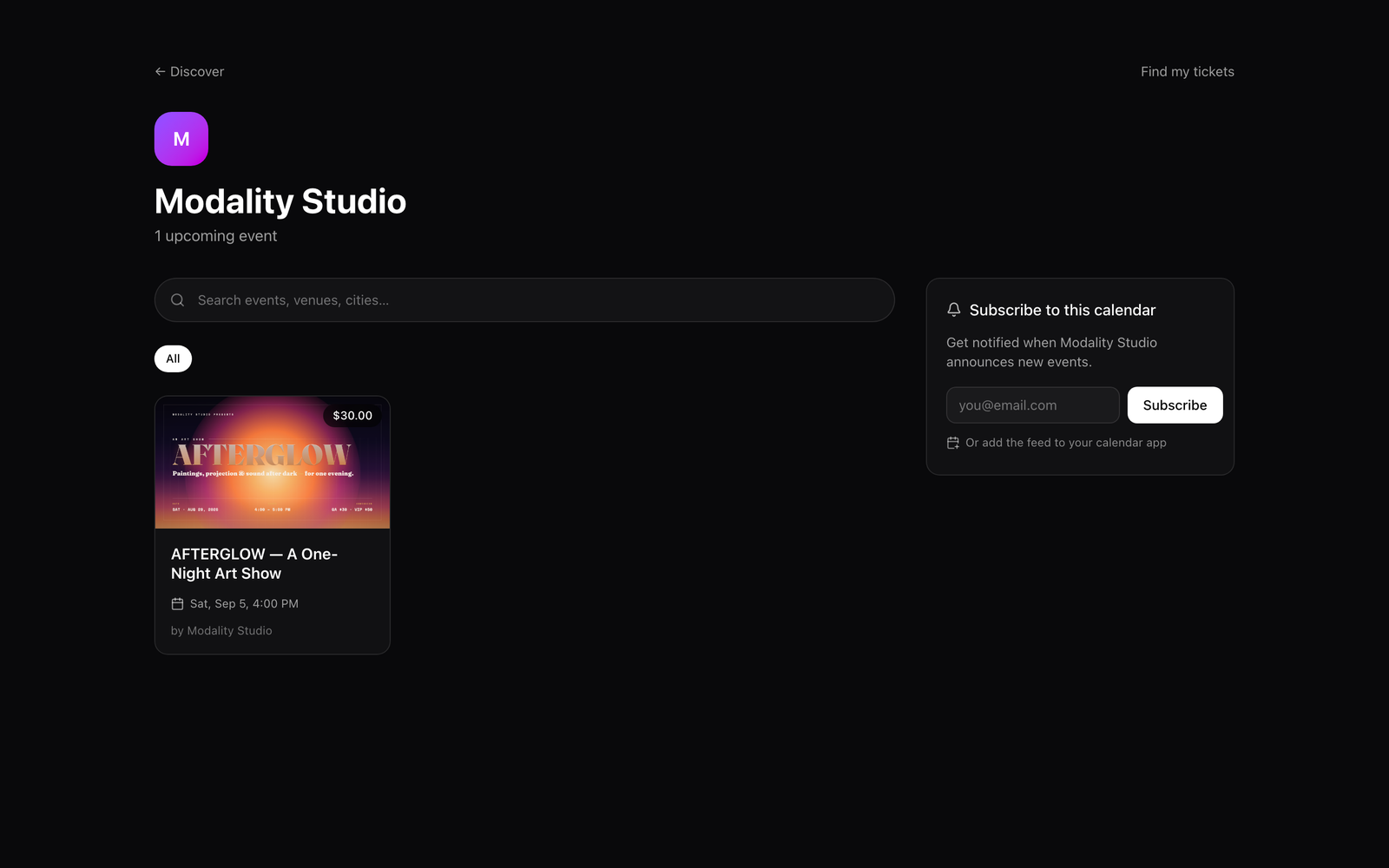
Every workspace exposes its public events as a live iCalendar (.ics) feed that people can subscribe to in Apple Calendar, Google Calendar, Outlook, and any other calendar app. Once subscribed, the app polls the feed and keeps the person's calendar in sync as you add, move, or update events.
The feed URL
The feed lives at /api/v1/calendars/<workspace-slug>/ics and is returned as text/calendar. Add ?category=<name> to publish a category-specific calendar (e.g. only your Music events). Responses are cached for an hour.
- What it includes, published events that are Public, Searchable, or Unlisted (Private events are excluded), ordered by date.
- One entry per showing, a multi-showtime event syncs every showing as its own calendar entry with a distinct UID (and its per-showing label in the title), instead of collapsing to the earliest date.
- Rich detail, each entry carries the title, description, location (venue + address), and a link back to the public event page. Events default to a 2-hour duration when no end time is set.
Email subscriptions
People can also subscribe to a workspace calendar by email (optionally filtered to one category). Subscribing creates or updates a People/Contact record in your CRM (sourced as calendar_subscribe) and records the subscription, idempotently per email, so a repeat subscribe never duplicates the contact.
Universal Search
Universal search is the consumer discovery search that spans the whole platform, distinct from the operator CRM search inside your workspace. A single query fans out across five buckets and returns matches from every workspace:
- People, public profiles, respecting the viewer's blocks/hidden users.
- Events, both your native public events and external (cached web) events, matched on title, city, or venue, and ranked by next upcoming date.
- Posts, feed posts whose text matches, media posts surfaced first for the explore grid.
- Venues, venue places by name or city.
- Tags,
#hashtagsmined and tallied from post text.
Search is exposed at /api/v1/discover/search. Passing a type narrows to a single bucket with a larger result cap (for a "see all" tab); the default all returns a small slice of each. A blank query returns nothing.
Screenshot: the mobile universal search screen with tabs for People, Events, Posts, Venues, and Tags, showing a mixed 'all' result set for a sample query.
Demo GIF / screenshot to be added
The Social Event Feed
Every event, native or external, has a social layer so attendees can talk about it and see who else is coming.
The event wall
Each event has a wall: the feed posts (text and photos) that reference it, keyset-paginated and public to read. It's served from /api/v1/discover/feed for exactly one event, pass an eventId for a native event or a discoveryEventId for an external one. Signing in only powers the "liked by me" state on posts.
Who's going
/api/v1/discover/going returns the going count and attendee avatars for any event, native or external. When the viewer is signed in, it also flags which attendees they follow ("friends") and surfaces a top-level friends-going count, the same signal that highlights events on the map.
Engagement signals
As people browse, the app logs lightweight view / click / share interactions to /api/v1/discover/interactions. These are best-effort and only recorded for signed-in users (anonymous browsing is a no-op), and they feed the affinity model that personalizes each viewer's map ordering.
Alerts: Notify Me & Region Subscriptions
Viewers can subscribe to be alerted about events. Alerts are delivered to the in-app Alerts feed and as push notifications, alongside social notifications.
Event subscriptions ("Notify me")
- A viewer taps Notify me on a specific event (native or external).
- If the event materially changes (date/time or location), subscribers are alerted with what changed.
- They also get a one-time "starting soon" reminder when a subscribed native event is within the next 24 hours (de-duplicated per subscriber, sent from the reminders cron).
Region subscriptions ("Alert me for this area")
A viewer can subscribe to an area, a center point and radius, optionally narrowed to a category and a maximum price. Whenever the discovery collector ingests genuinely new events in that area, matching subscribers get a new-event alert. This is explicit opt-in, and it's carefully throttled:
- Idempotent, each new event alerts a subscription at most once, so re-ingesting the same event never re-notifies.
- Capped & summarized, above a small per-run cap (so a metro's very first ingest, where every event is "new," can't flood a subscriber), the alerts collapse into a single "N new events near you" summary.
- De-duplicated, subscriptions are reused for an equivalent area + category + price, so repeated "Alert me" taps don't stack duplicates, and cross-source duplicates of the same real event are collapsed before matching.
All of a viewer's event and region subscriptions are listed and manageable under /api/v1/discover/subscriptions (and its event / region sub-routes).
Screenshot: the mobile subscriptions manager listing 'Notify me' events and saved region alerts (area radius, category, max price), each with a toggle to turn alerts off.
Demo GIF / screenshot to be added